Thursday, October 26, 2006

Project 2 - final touch ups and problems

Scroll Bars

Qn: Why is it that when i add in the scroll bar, the background is always white? No matter how i try to change the background colour, it still looks white when i tested it out on the web browser? What should i do?

Qn: Can we add scroll bar to a 'table'? How?

- Decided not to add in the scroll bars. I had spent too much time on trying to resovle this problem (about 2 days). Should resolve other problems too.


Images

- Didn't manage to take photo of some other types of dishes (e.g duck, chicken etc.)
- went online to search for the images but can't find what i wanted.
- recalled that for some webpage, when the image is unavailable, they would put 'temporary unavailable'. hence, i created and image of 'temporary unavailable' to substitute the missing images, hoping to make the website looks more complete and professional.


Webpage

- one of my main aim for this project is to create a website that looks professional and error free.
- by saying error free, i am referring to things such as:

* when we browse the webpage, the webpage does not 'move'or the items on the webpage does not 'jump' or 'move' when we switch the pages.
* the links on the website works well and there are no broken links.
* the website can be viewed using many types of browsers such as Internet Explorer, Safari and Firefox

- i am proud to say that i have achieved my goals.

Tuesday, October 24, 2006

Project 2 - final touch ups and problems

Scroll Bars

Qn: Why is it that when i add in the scroll bar, the background is always white? No matter how i try to change the background colour, it still looks white when i tested it out on the web browser? What should i do?

Can we add scroll bar to a 'table'? How?

- Decided not to add in the scroll bars. I had spent too much time on trying to resovle this problem (about 2 days). Should resolve other problems too.


Images

- Didn't manage to take photo of some other types of dishes (e.g duck, chicken etc.)
- went online to search for the images but can't find what i wanted.
- recalled that for some webpage, when the image is unavailable, they would put 'temporary unavailable'. hence, i created and image of 'temporary unavailable' to substitute the missing images, hoping to make the website looks more complete and professional.


Webpage

- one of my main aim for this project is to create a website that looks professional and error free.
- by saying error free, i am referring to things such as:

* when we browse the webpage, the webpage does not 'move'or the items on the webpage does not 'jump' or 'move' when we switch the pages.
* the links on the website works well and there are no broken links.
* the website can be viewed by many types of browsers such as Internet Explorer, Safari and Firefox

- i am proud to say that i have achieved my goals.

Sunday, October 22, 2006

Blog skins

visited some of the classmates' blog and realised that 3 of us has similar blog skin! ha.. wonder why. I chosed this blog skin out of the rest is because of its good colour combination, its design (white dash as frame to frame up the post) which is very neat and green is good for your eyes! ha..

But i also realised that because i am using the Beta version, my blog looks a little different from the others who are using the same design. Both looks fine to me and i don't think it matters much. the only thing that i am worried about is the tool button Photobucket - Video and Image Hosting that is on the right side of this blog. it seems that anyone visiting this blog can click on it and make changes to the side bar. Wonder why did blogger made it so?

Project 2 - Change the layout from ' layers' to 'tables'

Phew... Managed to re-construct the layout using tables. Realised that it is actually much neater and easier to do editing! Regret not changing it earlier! But better late than never.. Spent 2 full day to do the editing but its worth it. BUT, new problems come out. example would be that it is hard to position the images at excatly where i would like it to be due to the boundaries of the tables. Still resolving the problems.

Thursday, October 19, 2006

Project 2 - Changes

Received many good feedbacks today. Found out that my webpage looks messy because i did not align the text and images well enough. Another reason is also because i had used too many different types of font within the webpage. Hence, I would like to do the following changes:

- limit the types of fonts used in the website to 2, maximum 3.
- align the text and images properly.
- if i want to align the text and images, i MAY need to re-draw the layout in 'tables' as i have a feeling that editing the alignments with layers may be a big problem. I may even take less time if i re-draw the layout in 'tables' (hopefully i don't need to do so!)

Monday, October 16, 2006

Project 2 - problems and solutions

1. Design

- struggling with the design. I want the website to have an oriental look but it would result in the webpage looking very messy and confusing. Tried to simplify the design and the webpage ended up looking too 'mordern'. Stuck.

2. Editing

- editing is really hard. When i move a certain box or image, the other things would also shift at the same time. As a result, i cant do much editing with the wedsite even when i am not satisfied with some parts of it. Found out that this usaually happens when i use 'layers' instead of 'tables' when i did the layout of the webpage. presentation is few days away. Would try to change the layout into tables if i can afford the time after the presentation on this thurs.

3. Images

- the images didn't turn out as good as i would like them to be. The colours of the images differs when i view the webpage in different browser. I had un-tick the boxes when i save the images as JPG for web, but the same problem still exist.

Tuesday, October 10, 2006

Adding links and tags

hurray! found the way to add in the link for my site meter! And i have also found the way to add in the advertisement tags! Didn't realise that it can be so easy. Maybe this new beta version is better afterall..

Blogger Beta

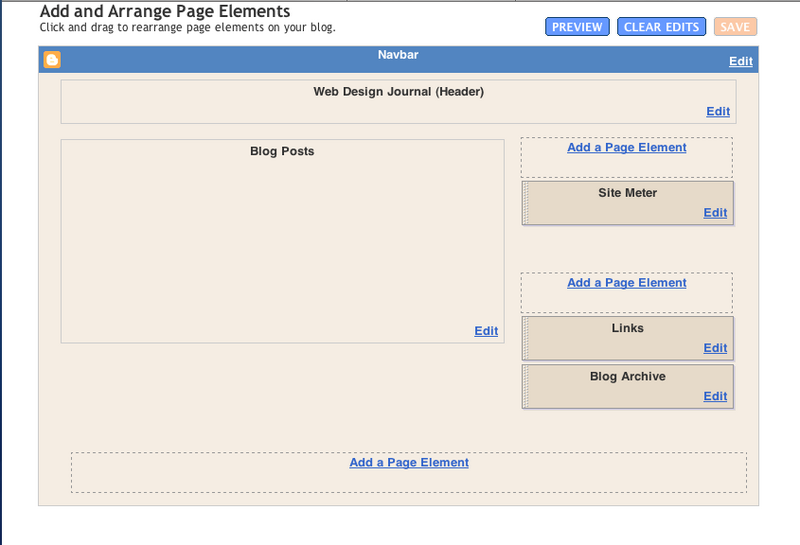
Blogger Beta has its pros and cons. saw the Pro on 06/10/06 but when i want to add back my original links to my site meter and some advertisement tags which i mentioned in my past post, i cant add them in at all. This is how the new template page looks like:

Photobucket - Video and Image Hosting

Tried to edit using the html instead of the one above but the html code is simplified to such an extend that i cant find where the part for the links section is. Kind of regret changing it to Beta version now. But its a new experience. A very troublesome one.

Friday, October 06, 2006

new blogger - Blogger beta

i tried out the blogger beta today just to see what kind of tools it provides and comparing it with the older version. i feel that this Beta version would make blogging much more easier to people who has no knowledge on web design at all. This new version even allows user to change the colour and layout of the blog very easily, with guided tools. However, as it is a Beta version, all the tags that i had added to my blog previously were gone and some, like that site meter, could not be replaced at the moment (it could not deta my account in blogger as my present account is under Beta Blogger which is not available at the Site Mtere's site yet.).

Thursday, October 05, 2006

tutorial notes - Content Management System (CMS)

Free stuff

Linux
Apache
Mysal
Php
_________________________________________________________

JAVA -> Free/Commercial
J2EE
ASP -> Microsoft
ColdFusion


Related links:

CMSMATRIX -> good tool to find out stuff for CMS
open source CMS -> try out Mambo

Mambo:
- easy to set up and use (sells itself as)
- but tend to make things very genaric (?)

Joomia:
- similar to Mambo

Drupal:
- GOOD
- widely used (used by Bill)
- flexible
- can tag your information
- searchable (have search tool bar on your site)
- publishing option available (post can be chosen to be 'public' or 'private') <- nice!
- can create content, upload video and images all in one website <- cool!
- can have different style sheet for different types of post (easy to edit and set to your own preference) e.g set up rules and fonts etc...
- themes that can be configured (but customizing it is not that simple!)

Plone (wrong link.. to be edited)
- powerful system
- easy to run

wordpress (to be edited)
- widely used for blogs


Note: for web journal, making it for viewers to access you stuff easily can be a bit tough. Hard to arrange. (But i shall try and challenge it..)